
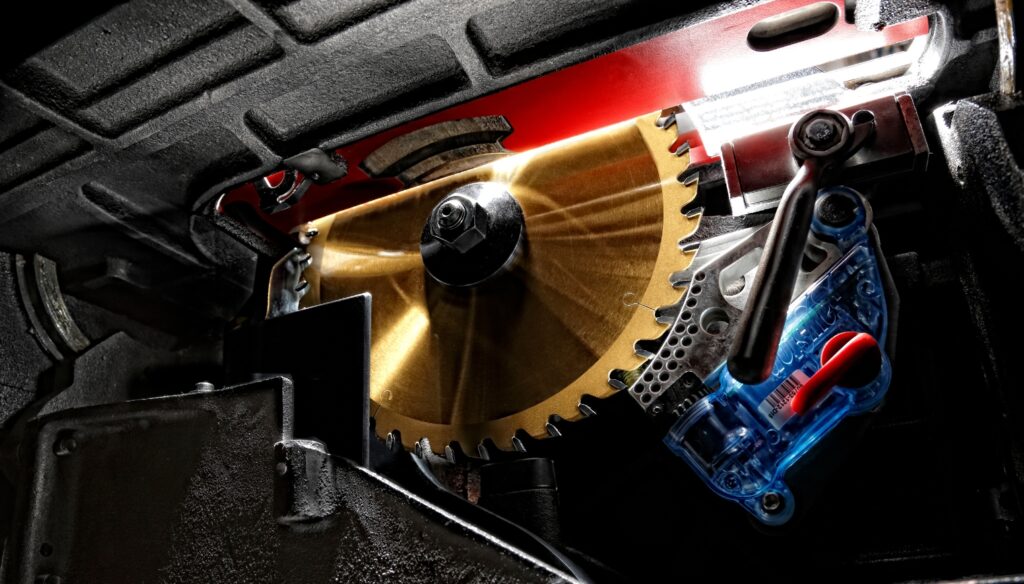
A SawStop brake cartridge is a key part of the saw’s safety system. It’s a small, replaceable component designed to do one very important job: stop the blade if it detects contact with skin. Each SawStop table saw is equipped with a brake cartridge, so once your saw is delivered, you can get started straight away.
Inside the cartridge is a spring-loaded aluminium brake pawl. Under normal operation, it sits clear of the blade. If the system detects human skin contact, the mechanism is triggered, and the pawl is driven into the spinning blade. At the same time, the blade is pulled down below the table surface, and the motor automatically shuts off.
The result is a controlled, rapid stop that happens in 5 milliseconds.
Because the cartridge physically absorbs that energy during activation, it is a single-use component. Once it has activated, the cartridge cannot be reused and must be replaced before the saw can be used again.
That’s the starting point for understanding what happens after an activation, because everything that follows is simply part of completing and resetting the safety event correctly.
What Happens During Activation
When the system detects skin contact with the blade, the brake cartridge is deployed instantly.
The sequence happens in a fraction of a second:
- The brake pawl is driven into the blade.
- The blade is forced to stop almost immediately
- The arbor mechanism drops the blade below the table
- Power to the motor is cut
- The saw displays a “Replace Cartridge” indicator
The saw itself is engineered to withstand this event. While the brake cartridge is sacrificed in the process, the machine is not damaged to the point of requiring repair or replacement.
In practical terms, the activation is contained to two consumable parts: the brake cartridge and, in some cases, the blade.
What Needs Replacing
After an activation, there are typically two items to consider.
The brake cartridge, which has performed its one-time safety function, must be replaced.
The blade, which is often impacted during activation. In many cases, the brake pawl locks into the blade teeth, and this usually means the blade will need replacing as well.
Some users choose to have blades inspected or repaired by a specialist where possible, while others replace them as standard practice. In most situations, planning for a replacement blade is the simplest and most practical approach.
Support After Activation
SawStop operates a structured process for handling brake activations.
When a cartridge has been deployed, you can submit an activation report and return the used cartridge for inspection. This allows the engineering team to review what triggered the system.
SawStop is dedicated to safety, we don’t just make saws – we make promises, and we stand by them. Where skin contact is confirmed, SawStop will provide a replacement cartridge under its support programme., SawStop provides a replacement cartridge under its support programme. You can submit details through the Report a Save process, which helps verify the activation and ensures support is provided to get the saw back in operation as quickly as possible.
This helps ensure the system is functioning as intended, while also providing clarity and support after an unexpected event.
Replacing A SawStop Brake Cartridge
One of the most practical aspects of a SawStop activation is how quickly the saw can be returned to work. Replacing the brake cartridge is straightforward and typically takes only a few minutes. Once the new cartridge and blade are fitted, the saw is ready to use again.
The reset process follows three simple steps:
- First, ensure the saw is fully powered off at both the main switch and disconnect switch before any work is carried out.
- Second, reset the arbor block. During activation, the mechanism disengages during the braking process and must be returned to its correct position.
- Third, install the replacement brake cartridge and a suitable blade, then restart the saw.
Some users choose to have blades inspected or repaired by a specialist where possible, while others replace them as standard practice. In most situations, planning for a replacement blade is the simplest and most practical approach.
With a spare cartridge and blade available, downtime is usually minimal. Without spares, the only real delay is waiting for replacements to arrive.
Non-Skin Activations
While SawStop’s system is designed specifically to detect human skin, certain materials can sometimes trigger activation.
Wet timber, green wood, pressure-treated material, or contact with conductive elements such as metal can occasionally activate the brake. These instances are uncommon but known behaviours of a highly sensitive safety system.
To manage this, SawStop includes a bypass mode. This allows cutting of known conductive materials where appropriate. However, it is designed as a deliberate, cut-by-cut setting rather than a permanent override, reinforcing that safety detection remains active by default.
If repeated activations occur on dry, suitable material, it is recommended to review the setup or contact our support team to ensure everything is operating correctly.
The Key Takeaway
A brake activation is a clear signal that the safety system has performed exactly as it was designed to. It results in replacing a cartridge and often a blade, and in a short period of downtime while the saw is reset.
But more importantly, it represents a system designed to intervene where a standard table saw cannot.